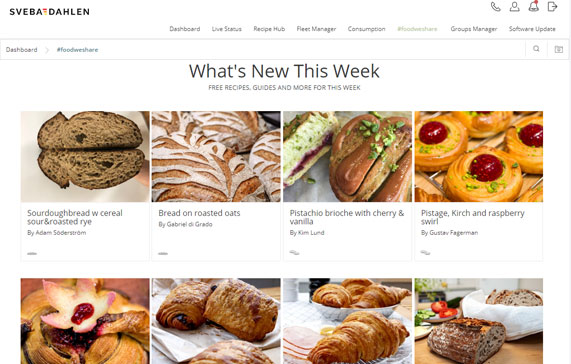
The Recipe Hub and #FOODWESHARE
The Recipe Hub offers a whole new way of working with recipes. Collect all recipes in one place, send them to all your ovens with the right oven settings ready to go. Share and send between the ovens, with just a few clicks so all ovens get the same recipe. Bake over and over again, anywhere, and get the same perfect baking result.
With #foodweshare it is easy and fun to create a recipe in Sveba Connect. Add instructions on how to make the product, which ingredients to use and add the ovens baking parameters. It is easy to upload images of each step in the process and of the baked end-product. Make descriptions, choose which category the product fits in and for how many people. Almost unlimited possibilities! Create, download to your ovens, share your wonderful creation with the world!
Create and Manage Recipes
With Recipe Hub it is easy to create new oven recipes with all oven parameters needed. All necessary setting are available, basic oven settings and more advanced settings. Set time for each step, temperatures, if steam is needed etc. Easy to understand and easy to use, just follow the instructions to finish the recipe. There are also lots of settings to simplify the handling of recipes. Make it easy to sort the recipes by adding information for: duration, language, author, category and oven type.

Send Recipes to Oven or Download Recipes to Device
With a few clicks, one or more recipes from Recipe Hub can be distributed to connected ovens. Keep high quality by making sure all ovens run with the correct recipe while baking – perfect for Supermarkets and bakeries with multiple ovens, get the same results in all stores. It is very simple to download or distribute recipes from Recipe Hub. Select the recipes to be sent to one or more ovens by clicking in the circles to the left of the recipe names. Then click on the diskette icon to download to device, or the paper plane to send the selected recipes to ovens. When pressing the paper plane all your connected ovens displays, select ovens and send with one click! A confirmation request will always be sent to the selected oven.

Get Recipes from Connected Oven
To upload recipes to Recipe Hub from an oven, go to Fleet Manager and select the oven. Go to the tab named Recipe to see all oven recipes locally saved in the oven. With one click it is possible to download it to your device or save it to the Sveba Connect Recipe Hub and later distribute to your other connected ovens.

Download from #FOODWESHARE
With #foodweshare it is easy to find new recipes created by other bakers from all over the world! Browse through the shared recipes or click on a category to find inspiring and tasty recipes. Add any recipe to the Recipe Hub with just a simple click, and from there it is simple to send recipes to the connected ovens. It is as simple as that! Get all the information and settings needed in one click!
Among the recipes you find recipes from Swedish champion winners from Baker of the Year. Share your best recipe and let other enjoy it – world wide!