
Baking made easy!
SD Amigo Control Panel for D-Series Deck Ovens and Double Depth Deck Ovens

The SD Amigo Control Panel for Deck Ovens is a user-friendly control panel, designed to meet the essential requirements of bakers.
It comes equipped with features such as offset temperature control, weekly schedule, clock, backup battery, and individual settings for front, top, and bottom heat. This panel provides all the necessary tools for the daily baking needs of professionals.
The SD Amigo Control Panel is standard for the Sveba Dahlen Deck Ovens.
Comparison between the Deck Oven Control Panels
| Function | SD Touch II, Deck Ovens | SD Amigo, Deck Ovens |
|---|---|---|
| AC Guard. Distributes power according to heating needs without overloading | ✔ | ✔ |
| Programmable week timer with start & stop settings | ✔ | ✔ |
| ECO mode, automatic, standby Energy-Saving Mode | ✔ | ✔ |
| Turbo function, if necessary, adjustment is quickly done towards the required temperature by the automatic turbo function | ✔ | ✔ |
| Damper motor | ✔ | |
| Separate control of top and bottom heat | ✔ | ✔ |
| Recipe Handling: Function to programme a recipe with a simple baking routine | ✔ | |
| Recipe Handling: Function to transform a successful bake into an oven recipe | ✔ | |
| Recipe Name: Possible to add individual names to recipes | ✔ | |
| Recipe Images: Possible to add product images to recipes | ✔ | |
| Adjustable temperature for steam generator | ✔ | ✔ |
| Energy calculation. Calculates the oven’s consumption in kW. Per batch, per day, per week, per month | ✔ | |
| Real time clock | ✔ | ✔ |
| Touch screen with high ease of use | ✔ | |
| Automatic start up program | ✔ | ✔ |
| Service / Cleaning lighting. Lighting without the oven being on | ✔ |
Buttons and Functions
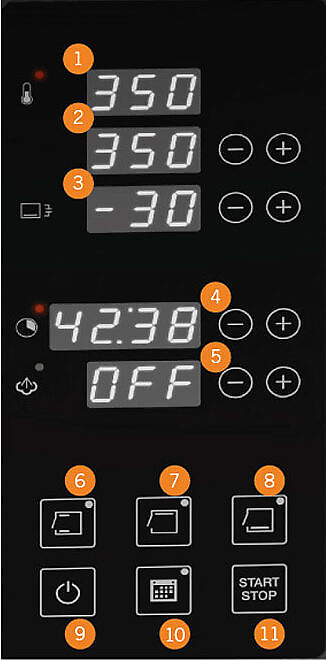
- Actual temperature
- Set temperature
- Offset temperature bottom heat
- Baking time
- Steam time and status
- Front heat
- Top heat
- bottom heat
- On/Off
- Weekly Schedule
- Start/Stop
Features and Benefits
Backup Battery and Replaceable Backup Battery
The clock and weekly schedule will not lose the memory in case of a possible loss of voltage.
If the backup battery runs out, this is replaceable and an indication of discharged battery is shown on the display.
AC guard
Makes it possible to connect the oven to a smaller circuit breaker. The oven distributes the power to the decks that need it most. Read more about AC Guard here.
Fast turbo function
The oven quickly heats up to the set baking temperature. Fast turbo function.
The oven quickly heats up to the set baking temperature.
Display with time and weekly schedule – easy setting with on/off function
When the oven is switched off, the panel displays the clock with real time and whether the weekly schedule is active or inactive.
Exact baking time
When baking time is above one hour, time shows hour and minutes. When baking time goes under one hour the time shows minutes and seconds. The baking time is specified in hours and minutes. Signal at the end of baking time.
Buttons for separate settings of front-, top- and bottom heat
Full control of the baking process.
Buttons for offset temperature
Set bottom heat offset temperature in relation to the oven temperature. The offset temperature can be set as a positive or negative value. The level is fixed even if you change the desired baking temperature. For example, oven temperature 200°C, offset temperature: -30°C = bottom heat 170°C.
Smart Offset Eco Mode
Eco Mode starts when the oven has been inactive for a specified period (adjustable time). Eco mode works with an offset temperature and lowers the oven temperature by the desired number of degrees. Example: The offset temperature is set to 50°C, so the eco mode lowers the oven temperature to 200°C if the current target temperature is 250°C.
LED Display
LED Display with white light and functionality with three to four characters or numbers.
Instruction videos
Overview of buttons and functions
Activate AC Guard
Energy Saving Function
Adjust display and diode brightness
Adjust baking time
Set time and weekly schedule
Baking with steam
Bottom heat temperature offset function
More control panels
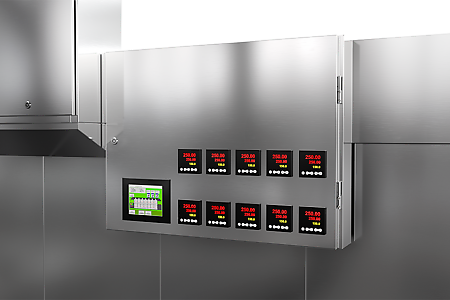
Tunnel Oven Control Panel
The HMI control panel with touch screen is easy to overview and operate. Control the top and bottom heat in all zones, recipes, alarms and more. Get informative logs and do your software updates over the internet - quick and simple.

SD Amigo Pizza
An exceptionally user-friendly control panel packed with features, providing everything necessary for a professional pizza baking experience.

SD Touch II Rack Oven
The SD Touch II panel is standard on all our rack ovens. It is very powerful and comes with smart features that make everyday life easier for bakers worldwide.
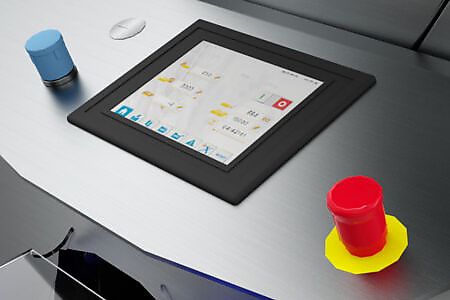
Glimek PLC SD600 Touch Panel
Available with Glimek Dough Divider SD600. A 7" touch panel with a user-friendly interface with many useful functions, which makes it very easy to use.